How to Make AI UGC Ads for Your App: A 207 Day Winner, Rebuilt Shot by Shot
An AI UGC ad for an app is a short, phone style video where an AI generated person shows a problem and then your app solving it. The fastest way to make one that works is not to invent it. Find an app ad that has already been running for months, copy its structure shot by shot, and replace the person, the app and the words. Then label it as AI, because the platforms and the law now require you to.
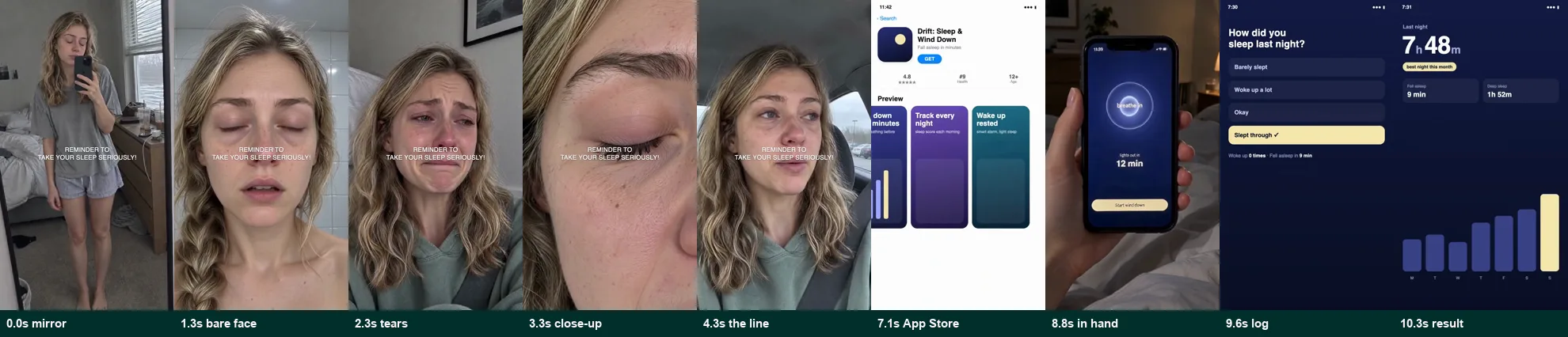
That is exactly what I did for the video below. I pulled 185 live app ads from the Meta Ad Library, picked one that had been running for 207 days, broke it down to the frame, and rebuilt it for a fictional sleep app called Drift. Same shots, same timing, same song. Different person, different app, different line.
The finished ad. 11.3 seconds, 9 shots, one spoken line.
Everything you see is AI generated except the app screens, which are a real interface we built. The woman does not exist and neither does the app. This is a sample, not a testimonial.
AI GENERATED · FICTIONAL APP · SOUND ON- Start from survival data, not taste. Of 185 live app ads we pulled, the one we rebuilt had run for 207 days, shared its creative across 4 ads, and came from an app Sensor Tower estimates at about $100,000 in revenue last month.
- The winning structure is 7 seconds of raw emotion with no app on screen, then 4 seconds of proof ending on a number.
- Generate one face and build every shot from it. Turn stills into short motion clips; stills read as a slideshow.
- Never let AI draw your app's interface. Record the real app.
- Label it. TikTok makes an AI disclaimer mandatory for AI generated ads, Meta labels detected AI ads, and the FTC's testimonial rule covers fake testimonials from people who do not exist.
1. Find an app ad that is already winning
Nothing else in this process matters if the ad you copy was never profitable. So start from proof, not from taste.
The Meta Ad Library shows every active ad on Facebook and Instagram, the date it started running, and how many ads share the same creative. It does not show spend. It does show survival. Advertisers switch off ads that lose money, so an ad that has run for months is usually paying for itself. That is a heuristic, not a guarantee, which is why I look for three signals at once.
I searched four phrases that app ads tend to use: download the app, this app changed, calorie tracker app and habit tracker app. I ran each in the US and the UK, filtered to active video ads. That returned 185 unique ads. Here are the longest running advertisers:
| Days live | Advertiser | Ads sharing the creative | Found by searching |
|---|---|---|---|
| 545 | PCOS Help App, Slayyy | 4 | this app changed |
| 471 | Brain.fm | 1 | this app changed |
| 449 | Survivor.io | 1 | download the app |
| 432 | TreatMyOCD | 3 | download the app |
| 403 | Whatnot | 1 | this app changed |
| 307 | Loosid Sober Dating | 2 | this app changed |
| 300 | Amino | 1 | this app changed |
| 297 | The Dailee | 1 | habit tracker app |
| 293 | ReVive: Deleted Photo Recovery | 3 | download the app |
| 281 | SleepWatch | 2 | this app changed |
I did not rebuild the oldest ad on that list. Slayyy's 545 day ad is a celebrity cut out meme, which would be hard to adapt without borrowing someone famous, and TreatMyOCD's 432 day ad is a staged sketch. Instead I picked a second Slayyy ad, from their Sarah from Slayyy page, that had been running for 207 days:
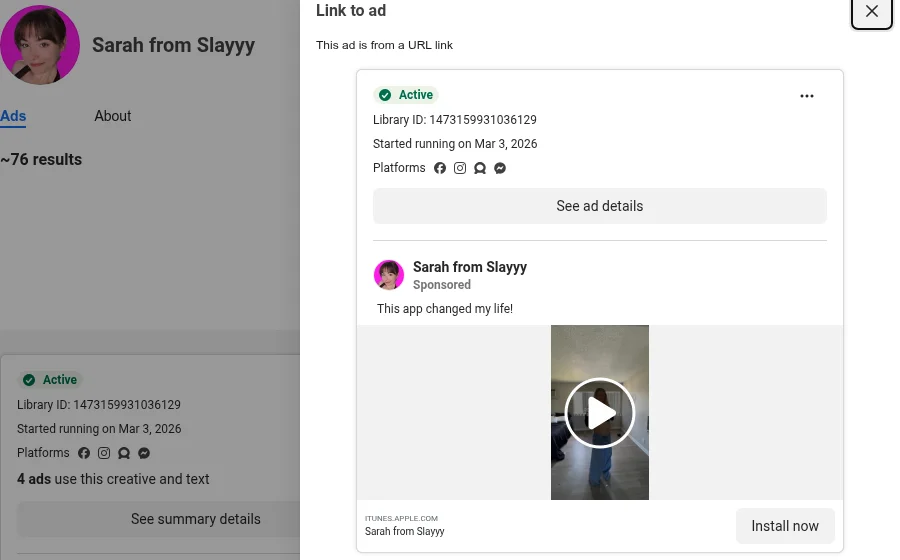
Three signals made it the right one:
- Four ads share the same creative. When an advertiser duplicates a video into more ad sets, it is usually because it keeps working.
- It survived a lot of testing. The page runs about 76 active ads. Most tests die in days. This one has lasted since March.
- It comes from an independent app that pays for every impression. Sensor Tower estimates that Slayyy's app, PCOS Pal, made about $100,000 in revenue and about 20,000 downloads worldwide last month, with 2,520 ratings averaging 4.7 stars. That is a real business, but not a brand that can afford ads that only build awareness. And the same company has another ad at 545 days, so this is a team that buys ads with discipline, not a lucky one-off.
The structure mattered too. It is a problem, a confession and a product, which fits a sleep app, a finance app or a game equally well.
2. Break it down second by second
Watching an ad tells you whether you like it. A breakdown tells you why it works. I transcribed the audio with word level timestamps, sampled a frame every 0.5 seconds, and ran a cut detector to find where each shot starts.
The result is a shot list you can build against. Here is the reference, in the order it plays:
| Time | Shot | What it does |
|---|---|---|
| 0.0 to 1.3s | Mirror selfie, full body | Shows the problem on the body. No words. |
| 1.3 to 2.3s | Bare face, no makeup | Raw and unflattering on purpose. |
| 2.3 to 3.3s | Close to tears | The emotional low point. |
| 3.3 to 4.3s | Extreme skin close up | Uncomfortably close. Hard to scroll past. |
| 4.3 to 7.3s | Car selfie, talking | The only spoken line: "I literally don't even recognize myself." |
| 7.3 to 8.8s | App Store listing | The first time the app appears. |
| 8.8 to 9.6s | Phone in hand, in a store | The app used in real life. |
| 9.6 to 10.3s | Logging screen | How it works, in one tap. |
| 10.3 to 11.3s | Result: 3.1 lb lost | Ends on a specific number. |
One caption sits in the middle of the frame for the first seven seconds and never changes: "Reminder to take PCOS seriously!" A hummed track plays under everything.
Once it is in a table, the logic is obvious. The first seven seconds never mention the app. They are pure feeling: four ugly, honest shots and one line anyone in that situation would say. Only after the viewer recognises themselves does the product appear, and it gets four seconds, ending on a result.
That split, about 7 seconds of problem and 4 seconds of proof, is the part worth copying.
3. Keep the structure, replace everything else
Copy the skeleton exactly. Replace the flesh completely.
Keeping the structure means the same number of shots, the same shot types, the same timing, the same pacing and the same kind of music. Replacing everything else means a different person, a different app, a different problem and a different line. Reusing someone else's footage, face or script is how you collect copyright claims and rejected ads.
For Drift, each shot kept its job:
| Time | Reference | Drift version |
|---|---|---|
| 0.0s | Mirror selfie, showing her body | Mirror selfie, slumped, three empty coffee cups on the dresser |
| 1.3s | Bare face | Bare face, puffy eyes, bathroom light |
| 2.3s | Close to tears | Close to tears from exhaustion |
| 3.3s | Skin close up | Eye close up, dark circle, slow blink |
| 4.3s | "I literally don't even recognize myself." | "I genuinely don't remember what sleep feels like." |
| 7.1s | App Store listing | App Store listing for Drift |
| 8.8s | Scanning food in a store | Wind down screen, in bed at night |
| 9.6s | Log a symptom | "How did you sleep last night?" |
| 10.3s | 3.1 lb lost | 7h 48m slept, best night this month |
The new line has eight words, close to the original's seven, so it fits the same three second shot. The caption became "Reminder to take your sleep seriously!", same length and same position.
For a real app, write the line from your customers' own words. Read your App Store reviews and support messages and pick the sentence people repeat. The reference line works because real people with PCOS say it.
4. Generate one face, then every shot from it
The fastest way to make an AI ad look fake is to let the person change between shots. So generate the person once, approve that image, and use it as the reference for every other shot.
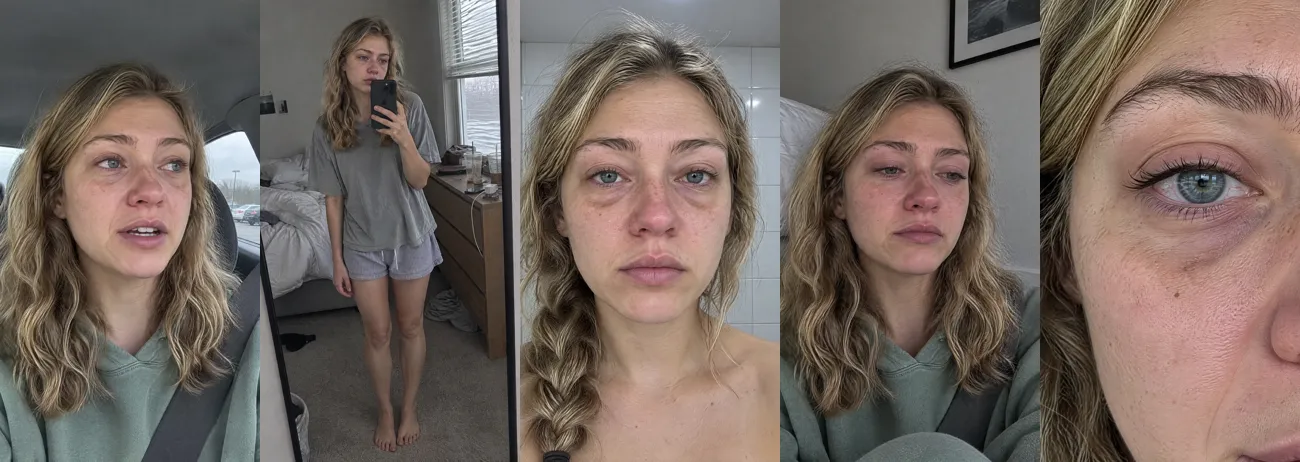
I used an image model for the stills and a video model for anything that moves. The prompts describe how a phone photo actually looks, not how a photographer would light it:
A photograph captured as a single frame from a video actually shot on an iPhone,
with the texture of real iPhone footage. The background is clearly visible, with
no depth of field blur. Skin texture is natural and fine, and the lighting is natural.

The same woman as in [reference]: same face, hair and freckles. A straight on
front camera selfie close up in the morning, completely bare skin, puffy under
eyes, blank flat expression. Harsh cool bathroom light from above.
Every prompt behind the six images and six video clips in the final ad is in the full prompt file.
Three things went wrong, and all three are worth knowing before you start:
- A frame from the real ad was rejected as a reference. I first tried to use a frame of the original creator to match the camera angle. The generator refused it. Describing the angle in words worked, and it is the right practice anyway: never feed a real person's face into your ad.
- Still images looked dead. My first cut used still photos with a slight handheld wobble. It read as a slideshow. I turned each still into a four second video clip where she blinks, breathes and tears up, then cut the most alive second from each one. That single change did more for realism than anything else.
- The talking clip came out 11 dB too quiet and opened with a 1.2 second breath that a transcription model heard as "I'm sorry". I cut the breath off the file and compressed the voice to the reference's level.
Generate the talking shot with the exact line in the prompt, word for word, or the model will invent its own words. Then transcribe the result to confirm what she actually said. My first transcription heard "wheel's like" instead of "feels like". A second model confirmed the audio was correct.
5. Build the app screens as real UI, not AI
Image and video models are bad at interface text. Buttons come out misspelled and numbers change between frames. For the part of the ad that sells the product, that is not acceptable.
So the Drift screens are a real interface: an HTML page with an App Store listing, a sleep log and a results screen, recorded in a browser at the ad's exact timing. The result number counts up to 7h 48m and a badge appears, all on real text.
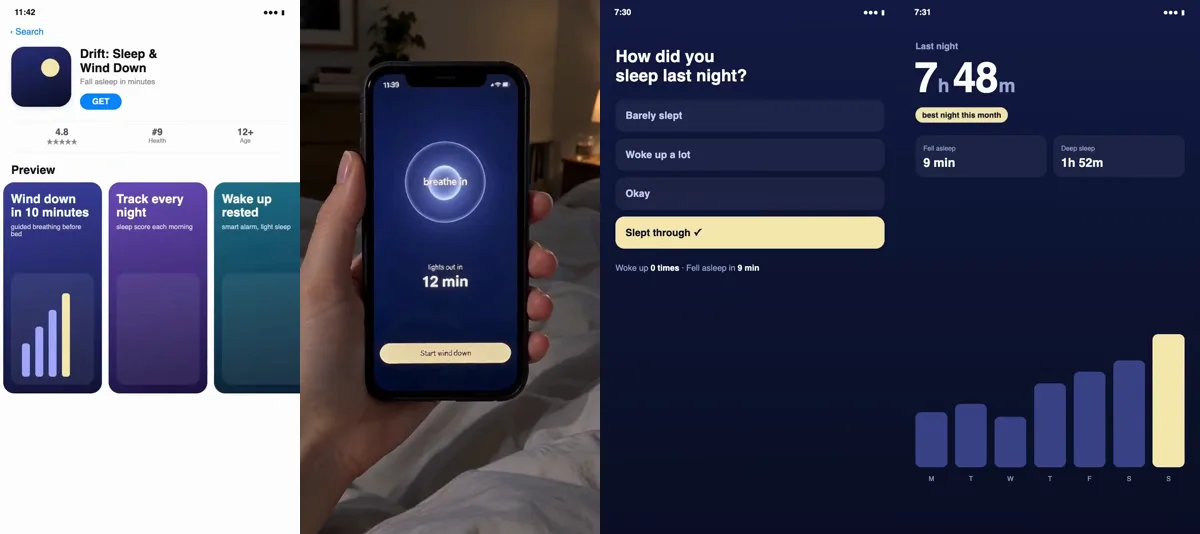
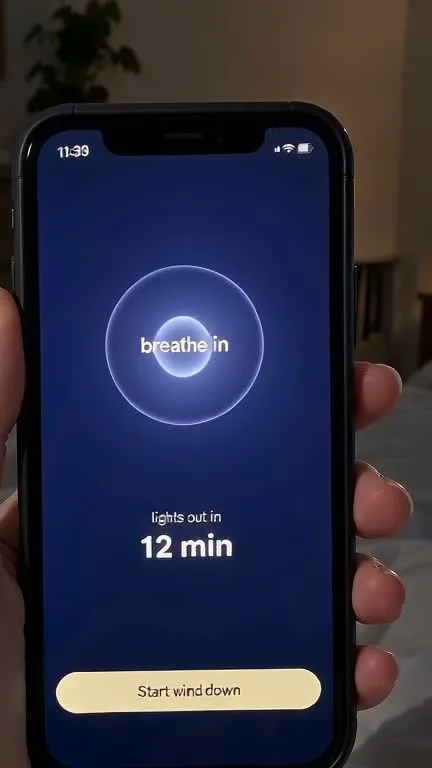
For the phone in hand shot, I gave the image model a screenshot of the real wind down screen as a reference. The screen text came out correct, which I checked at full size before using it:
6. Match the sound
With the sound off, the first four seconds of the reference are four silent pictures. With the sound on, they carry a mood. The song matters.
I identified the reference track by running three separate slices of its audio through Shazam. All three returned the same track, a hummed piece called hmmm hmmm hmmm. I then found where in the song the ad starts by cross correlating the two recordings, so our version hums on the same beat. Finally, I matched the levels: the music sits at about −22 dB, the same as the reference, and drops under the spoken line so the voice stays clear.
7. Check it frame by frame before you ship
Every version I exported looked fine at normal speed. Checking it frame by frame found two problems that viewers would have felt without knowing why:
- Two black frames between the talking shot and the App Store shot. The generated clip was a few frames shorter than planned.
- A one frame flash of the log screen before the phone in hand shot, from trimming the screen recording two frames too late.
Here is the checklist I now run on every ad before it goes out:
- No black or empty frames anywhere. Measure it, do not eyeball it.
- The same person in every shot.
- Every word on screen spelled correctly, at full size.
- The spoken line transcribed and matched word for word against the script.
- The total length and every shot boundary matched against the reference.
- Voice and music levels measured against the reference.
- Watched once with sound and once without.
8. Label it and stay inside the rules
This is the step most AI UGC guides skip, and it is the one that can cost you your ad account. There is a clear line between a dramatised creator style ad and a fake testimonial. Stay on the right side of it.
The FTC: no testimonials from people who do not exist
In the US, the FTC's Rule on the Use of Consumer Reviews and Testimonials went into effect on October 21, 2024, and lets courts impose civil penalties for knowing violations. The FTC describes what it covers like this:
"The final rule addresses reviews and testimonials that misrepresent that they are by someone who does not exist, such as AI-generated fake reviews, or who did not have actual experience with the business or its products or services, or that misrepresent the experience of the person giving it."Federal Trade Commission, August 2024
An AI person saying "this app changed my life" and presented as a real user is exactly that. So:
- Never present the AI person as a real customer. Treat them as a character in a dramatisation.
- Never show a result, like "7h 48m slept" or "3.1 lb lost", as if a real user achieved it, unless you can back it with real data from your app.
- If you want a real testimonial, get a real customer on camera.
At Surfio this is a standing rule: the presenter is AI, and we never present it as a real customer.
TikTok: the AI disclaimer is mandatory
TikTok Ads Manager lists AI content as a case where a disclaimer is required, not suggested:
"Mandatory disclaimers: AI-generated, synthetic, or manipulated media. This includes images, video, or audio that are completely AI-generated or real source material that has been significantly modified by AI."TikTok Ads Manager help: About ad disclaimers
Ads Manager has a dedicated AI generated content disclaimer that adds a text label to the ad. Turn it on for every AI UGC ad.
Meta: AI ads get an "AI info" label
Meta says it will automatically apply an AI info label when it detects that an ad was created or edited with third party generative AI tools, using industry standard signals such as C2PA metadata. Ads about social issues, elections or politics must be disclosed by the advertiser whenever they contain photorealistic AI images, video or audio. Meta's help page has the current details, and they change often, so check it before you launch.
What it cost
The whole ad used 1,073 generation credits on one video platform:
| Item | What | Credits |
|---|---|---|
| 7 stills | The face, four emotion shots (one cut from the final edit), the mirror and the hand | 357 |
| 1 talking clip | 4 seconds, 720p | 156 |
| 5 motion clips | 4 seconds each, to bring the stills to life | 560 |
| Editing | Screens, captions, sound, assembly | 0 |
Two choices kept it down. I tested the talking clip at 720p first, and it was good enough to keep, so I never paid for the 1080p version, which was quoted at 920 credits on its own. And I built the app screens myself instead of generating them.
The biggest line was the motion clips, and it was the one that mattered most. If you cut anything, cut elsewhere.
What AI still cannot do for you
- Tell you which ad is winning. Days running is a proxy. Only the advertiser sees the real numbers.
- Know your customer's words. The line only works if real people say it. Find it in your reviews and support messages, not in a prompt.
- Tell you if your version works. Make three versions of the first few seconds, run them against each other, and keep the one that stops the scroll.
- Make it legal. Labeling, honest results and music rights are your responsibility, not the model's.
How we made this, and this article
Google asks publishers to explain who made a piece of content, how, and why. Here is ours.
- Who: Acesley Chan, founder of Surfio, ran the research and production. More about the author.
- How the ad was made: images with GPT Image 2.5 and video with Seedance 2.0, both run through Dreamina; editing, captions and sound in Hypit; app screens built in HTML and recorded in a browser; transcription with Whisper; music identified with Shazam; app revenue estimates from Sensor Tower.
- How this article was made: drafted with an AI writing assistant from our production notes, then checked line by line against the source files: the Ad Library pages, the Sensor Tower data, the credit receipts, the frame measurements and the transcripts. Every number in this article comes from those files.
- Why: this is the process we use for client videos, and this page is the sample we send to app founders who ask what an AI UGC ad from us looks like.
Read our editorial policy for how we research, fact-check and correct articles.
FAQ
What is an AI UGC ad for an app?
A short, phone style video where an AI generated person shows a problem and then your app solving it. It copies the look of user generated content, but no real creator is filmed, so it has to be labeled as AI and must not pretend to be a real customer.
Is it legal to use an AI person in an app ad?
Using an AI presenter is allowed on Meta and TikTok if you follow their AI labeling rules. What is not allowed in the US is presenting the AI person as a real customer: the FTC rule on consumer reviews and testimonials, in effect since October 21, 2024, covers testimonials that misrepresent that they are by someone who does not exist.
Can I copy a competitor's winning ad one to one?
Copy the structure, not the content. Keep the shot order, timing and pacing, and replace the person, the product and the words. Reusing someone else's footage, face or script risks copyright claims and rejected ads.
How long should an AI UGC app ad be?
Match the winning ad you are modeling. The reference here is 11.3 seconds: about 7 seconds of emotion with no app on screen, then about 4 seconds of app proof ending on a number.
How much does an AI UGC app ad cost to make?
This one used 1,073 generation credits on one video platform: 357 for seven still images, 156 for one talking clip and 560 for five motion clips. Editing, captions and app screens cost nothing extra.
Final thoughts
The creative part of a good app ad is mostly already done for you. Somebody has spent money finding a structure that works, and the Ad Library shows you which one it is. Your job is to take that structure apart carefully, rebuild it honestly with your own person, product and words, label it as AI, and check every frame before it goes out.
Sources
- Meta Ad Library, ad 1473159931036129 (Sarah from Slayyy), facebook.com/ads/library/?id=1473159931036129. Accessed September 26, 2026.
- Meta Ad Library search results for "download the app", "this app changed", "calorie tracker app" and "habit tracker app", US and UK, active video ads. Accessed September 26, 2026.
- Sensor Tower, PCOS Pal by Slayyy, Inc., worldwide revenue and download estimates for the last month, app.sensortower.com. Accessed September 26, 2026. Estimates, not reported figures.
- Federal Trade Commission, "Federal Trade Commission Announces Final Rule Banning Fake Reviews and Testimonials", August 2024, ftc.gov.
- Federal Trade Commission, "The Consumer Reviews and Testimonials Rule: Questions and Answers", ftc.gov.
- TikTok Ads Manager help, "About ad disclaimers in TikTok Ads Manager", ads.tiktok.com. Accessed September 26, 2026.
- Meta Business Help Center, "About AI info on ads created or edited with generative AI tools", facebook.com/business/help. Accessed September 26, 2026.
- Google Search Central, "Creating helpful, reliable, people-first content", developers.google.com.
Update log. September 26, 2026: first published. Added the compliance section, the Ad Library data table and Sensor Tower figures the same day.
Want this for your app? Send me your app and I will tell you which winning ad structure fits it, and what a version for your app would look like.
Email me your app